General
Overview
The General tab in Settings provides Admin users with a read-only view of important account information, including business details, owner information, legal registration data, statement delivery preferences, time zone settings, and deposit account information. This page serves as a centralized reference for account records and helps users verify the accuracy of the information. If any information appears incorrect, contact MX Merchant Support for assistance.
Prerequisites
- This tab is only visible to users with an Admin role.
Viewing General Settings
The General tile on the settings page lets you view information about your account. This is for viewing purposes only, as you can't make any changes.
In the Settings section, click the General tab.
Upon doing so, you'll see the account information broken into the following sections. Learn more by clicking each one below:
- Business information
- Owner Information
- Legal Information
- Statement Delivery Method
- Location Time Zone
- Funds Deposited To
- Internal Use
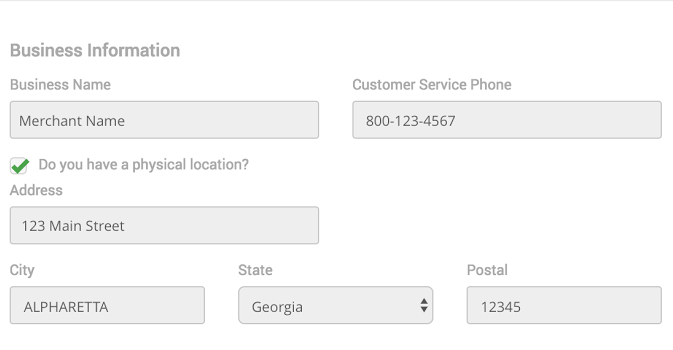
Business Information
In this section, you will see the following fields:
- Business Name - Your company's "Doing Business As" Name (DBA)
- Customer Service Phone - Customer service phone number. This may be blank if you didn't provide a customer service number.
- Do you have a physical location? - If the box is checked, meaning that you do have it, you'll see the following fields:
- Address
- City
- State
- Postal- Postal number.
Owner Information
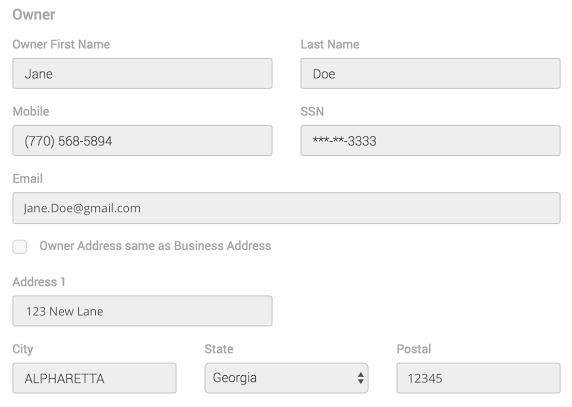
The owner section contains information about the account owner. The following fields are shown in this section:
-
Owner First Name
-
Owner Last Name
-
Mobile - Phone number to reach the owner.
-
SSN - Last 4 of the owner's social security number.
-
Email - The email address to reach the owner.
-
Owner Address same as Business Address - If this box is checked, it will pull from the business address in the image above. If not, you will see the following fields, with the information of the owner's personal residence:
-
Address
-
City
-
State
-
Postal - Postal number.
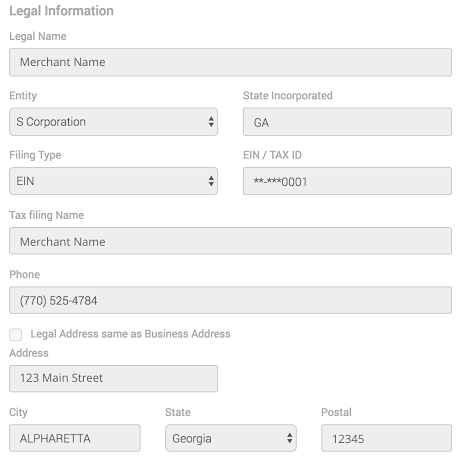
Legal Information
Legal information is additional information about the filing for this business:
- Legal Name - When the business was set up, what was the legal business name that was registered for this company
- Entity - S Corporation, LLC, Corporation, Limited Partnership, etc.
- State Incorporated - Where the business was registered
- Filing Type - EIN or TIN
- EIN / Tax ID - Last 4 digits only
- Tax Filing Name - Merchant Name
- Phone - Phone number used when registering the business
- Legal Address same as Business Address - If checked, it will pull from the business address section. Otherwise, it will show additional address fields, with the information of the registered business.
-
Address
-
City
-
State
-
Postal
-
Statement Delivery Method
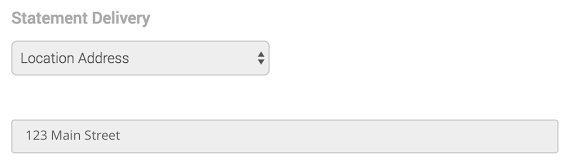
Statements can be mailed or provided through MX Merchant.
-
Online - Paperless statements will be displayed here.
-
Mailed - If you receive a physical copy of your statement in the mail every month, you will see Location Address is selected and the Address from the Business Information section is displayed again here.
Location Time Zone
When you settle your batch, this is the last 4 of the routing number and account number where your funds are being deposited.

Funds Deposited To
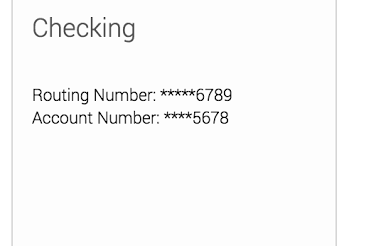
When you settle your batch, this is the last 4 of the routing number and account number where your funds are being deposited.
Internal Use
This section is only here to help our support staff in case you call in with any problems or concerns.
Additional Resources
Changes and Corrections
As stated previously, you cannot adjust any information in this section yourself.
However, if you ever see anything wrong with this information, feel free to contact support at 800-935-5961 or at [email protected].
Videos
- Creating Users: Instruction Video